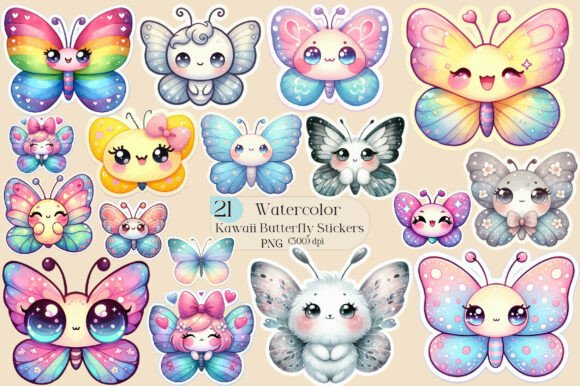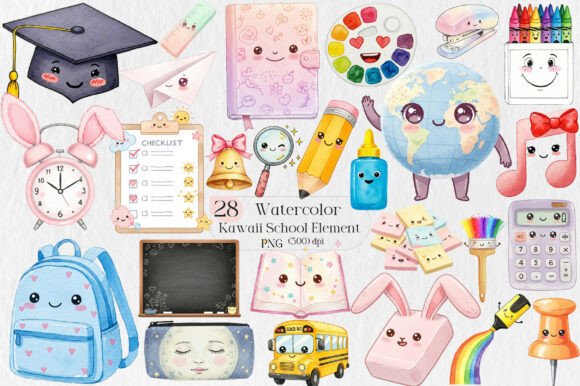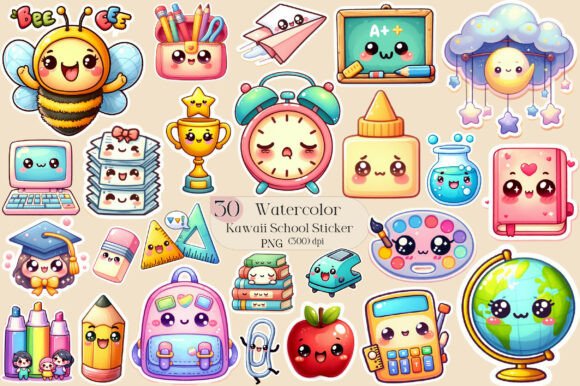
Kawaii School Sublimation Stickers
If you're designing school-themed merchandise, planning classroom decor, or launching a playful stationery line, Kawaii School Sublimation Stickers offer a fast, flexible, and professionally polished starting point. These aren’t generic clipart packs — they’re purpose-built, high-resolution PNG files designed specifically for sublimation printing and versatile digital crafting. Whether you run a small POD shop, teach art to middle-schoolers, design custom planners for educators, or create greeting cards for back-to-school season, this collection delivers immediate creative leverage — no design degree required.
What Makes These Stickers Stand Out?
At its core, Kawaii School Sublimation Stickers is a curated set of 30 hand-crafted, transparent-background PNGs — each optimized for crisp output across fabrics, ceramics, paper, and digital surfaces. Unlike low-res downloads or watermarked assets, every file renders cleanly at print sizes up to 12" without pixelation. The kawaii aesthetic — think soft pastels, gentle expressions, oversized eyes, and charming school motifs (notebooks, apples, pencils, backpacks, chalkboards, graduation caps) — balances nostalgia with modern appeal. It’s cheerful without being childish, nostalgic without feeling dated.
The transparency isn’t just convenient — it’s essential. Whether you’re layering stickers onto a navy hoodie mockup or placing a pencil icon over a gradient planner background, the clean alpha channel ensures seamless integration. No cropping, no white boxes, no post-processing headaches. And because they’re delivered as instant-download digital files, there’s zero shipping delay — ideal when you’re on deadline for a craft fair, school fundraiser, or client launch.
Real-World Uses — Beyond Just T-Shirts
While sublimation mugs and t-shirts are obvious fits, the true strength of Kawaii School Sublimation Stickers lies in its adaptability across contexts:
- Educators & Homeschoolers: Print them on laminated flashcards, reward charts, or classroom door signs. Use them digitally in Google Slides for interactive lessons or embed them into Canva-based parent newsletters.
- Print-on-Demand Sellers: Apply them to notebooks, tote bags, ceramic plates, and even kids’ lunchboxes via platforms like Printful or Gelato. Pair a “Math Is My Superpower” sticker with a matching mug design — consistency builds brand recognition.
- Digital Planners & Educator Tools: Drop stickers into Notion templates, GoodNotes lesson planners, or PDF-based student trackers. A tiny apple icon next to completed assignments adds visual rhythm and lightness to dense academic workflows.
- Small-Business Branding: Local tutoring centers, after-school programs, or literacy nonprofits can use these elements to unify their social media graphics, email headers, and printable handouts — reinforcing warmth and approachability.
- Crafters & Makers: Adhere them to wooden bookmarks, decoupage them onto glass jars for classroom supply storage, or cut them with a Cricut for layered cardstock invitations.
Commercial Use Done Right — Clarity Without Compromise
You’re allowed to use these files commercially — full stop. That means embedding them into your own original designs (e.g., a custom birthday invitation where the kawaii notebook sticker becomes part of a hand-drawn border), printing them on physical goods you sell, or incorporating them into digital products like editable Canva templates — as long as the final work reflects your creative input. You’re not reselling the PNGs raw, nor bundling them as free downloads — but everything else? Fair game.
This level of licensing flexibility matters — especially if you’re building a scalable product line. You won’t hit a wall mid-launch wondering whether your planner bundle complies with terms. There’s no hidden fine print about minimum order volumes, attribution requirements, or platform restrictions. What you see is what you get: clean assets, clear permissions, and full creative control.
Practical Tips Before You Design
A few real-world considerations help maximize results:
- Sublimation Tip: For best color fidelity on polyester blends or coated substrates, test one sticker on a small batch first — especially pastel tones, which can shift slightly depending on base material and heat press settings.
- Digital Workflow: When using in Procreate or Photoshop, keep layers non-destructive. Duplicate before resizing, and always check transparency against your intended background — sometimes subtle shadows or glow effects need minor tweaks for dark-mode compatibility.
- Brand Alignment: Don’t force kawaii into a formal context. These stickers shine in warm, inclusive, learner-centered environments — think reading nooks, STEM camps, bilingual classrooms, or indie edtech startups. They’ll feel dissonant in corporate boardroom decks or legal documents, and that’s okay.
- Scale Thoughtfully: At 300 DPI, most files scale cleanly from 1” to 8”, but avoid stretching tiny icons (like erasers or paperclips) beyond 4x — detail clarity starts to soften. Instead, group smaller elements or use them as repeating patterns.
Why This Fits Your Workflow — Not the Other Way Around
You don’t need to overhaul your process to benefit from Kawaii School Sublimation Stickers. They slot in wherever you already work: drag-and-drop into Canva, import into Silhouette Studio, paste into Illustrator artboards, or drop straight into your Shopify product mockups. No plugins, no subscriptions, no monthly fees. Just 30 intentional, joyful, technically sound assets — ready when inspiration strikes or deadlines loom.
For creators who value time, authenticity, and consistency, this isn’t just another sticker pack. It’s a quiet productivity multiplier — one that helps your messages land with more warmth, your products stand out with more personality, and your classroom or studio feel more like a place people want to be.
If you’ve used them for something unexpected — a library summer reading banner, a therapist’s anxiety-tracking journal, or a university orientation kit — we’d love to hear how they worked for you. And if you find yourself reaching for them again and again? That’s the sign they earned their place in your toolkit.